
Auto Refresh With Notifications for Web Pages
Overview
The software is designed to automate the process of refreshing a single web page until specific content is detected or excluded. It addresses the common frustration of manually refreshing pages—especially during high-demand online shopping scenarios such as checking delivery windows on Amazon or Instacart. By eliminating repetitive manual actions, it helps users save time and remain focused on other tasks.
Target users include online shoppers, digital assistants, and individuals who frequently monitor web pages for real-time updates. The tool is particularly useful for those seeking immediate access to limited-time availability, such as delivery slots or product restocks. It operates within a browser environment and supports both Windows and Mac platforms.
The developer, LittleMelonDev, has positioned the software as a lightweight utility focused on automation and timely alerts. While no broader company background is available, the tool’s functionality suggests a niche focus on enhancing web interaction efficiency. Real-world use cases include monitoring shopping carts, tracking flight availability, or checking for stock updates on e-commerce sites.
Key Features & Capabilities
- Automatic Page Refresh – Continuously refreshes a specified web page at user-defined intervals until target conditions are met.
- Content Exclusion Monitoring – Stops refreshing once predefined “excluded” content appears, allowing users to react to changes in real time.
- Customizable Notifications – Delivers audible alerts with user-defined sound cues when the desired condition is detected.
- Browser-Based Operation – Designed to run within standard web browsers without requiring system-level installations.
- Task Persistence – Maintains active monitoring even when the user is away from the device, provided the system remains awake.
For example, a user can set the tool to monitor an Instacart cart for a specific delivery window. Once the window appears, the software stops refreshing and triggers a sound alert. This allows users to respond immediately without constant manual checks. Similarly, shoppers tracking product restocks on Amazon can use the exclusion feature to halt refreshes when the item becomes available.
User Interface, Workflow & Performance
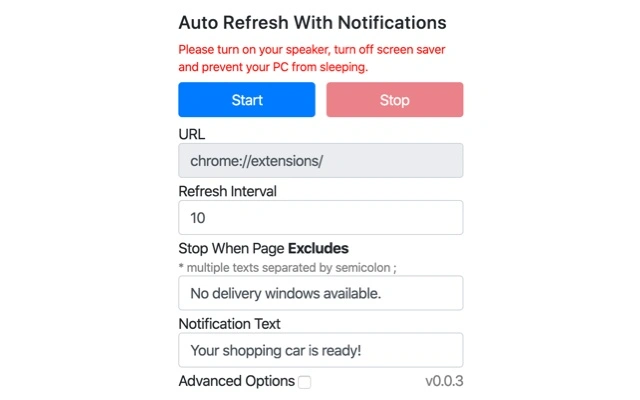
The user interface is minimalistic, focusing on core functionality: URL input, content exclusion settings, notification preferences, and control buttons. Navigation is straightforward, with a single window layout that prioritizes ease of use. The workflow begins with entering the target web page URL, defining exclusion criteria, and selecting notification sound.
Users can start, pause, or stop the refresh cycle with a single click. The tool operates in the background, allowing other browser tabs to function normally. No visible resource consumption indicators are provided, and the developer did not specify resource usage details. Performance observations are based on general software behavior patterns.
Stability appears to be consistent with typical browser extensions, though no crash reports or error logs were included in the release notes. The software maintains operation during extended sessions, but its effectiveness depends on the host system remaining active. If the computer enters sleep mode or the screen saver activates, the refresh cycle may pause.
Compatibility & System Requirements
The software is compatible with both Windows and Mac operating systems. It runs as a browser extension and does not require a dedicated installer. The installation size is 4.2 MB, indicating a lightweight footprint. The version is 1.0.1, released on April 10, 2024.
Exact system requirements were not listed. Compatibility with specific browsers or versions was not specified. The developer did not provide additional system requirements. Users should ensure their browser supports extensions and has JavaScript enabled to use the tool effectively.
Pros and Cons
Pros
- Automates repetitive page refreshes, saving time and effort.
- Supports real-time monitoring with customizable audio alerts.
- Lightweight at only 4.2 MB in size.
- Free to use with no hidden costs.
- Designed for specific use cases like shopping cart monitoring.
Cons
- No visible progress indicators during refresh cycles.
- Depends on system staying awake to maintain operation.
- Browser-specific limitations may affect functionality.
- Does not support multiple page monitoring simultaneously.
- Limited documentation or in-app guidance.
FAQ Section
Is the software compatible with all web browsers?
Compatibility with specific browsers was not specified. The tool is designed to run within a browser environment, but exact browser support details are not available.
Can I use this tool offline?
The software requires an active internet connection and a running browser to function. It cannot operate in fully offline mode.
How do I prevent the computer from sleeping during use?
To keep the refresh cycle active while away, users are advised to disable the screen saver and adjust power settings to prevent the computer from entering sleep mode.
Is the software secure to use?
The tool operates within the browser and does not collect or transmit user data beyond the specified web page and exclusion criteria. No security vulnerabilities were reported in the release.
What happens if the system goes to sleep?
If the computer enters sleep mode or the screen saver activates, the refresh cycle may pause. The tool will resume only after the system is reactivated.
Final Thoughts + CTA
Auto Refresh With Notifications delivers a focused, efficient solution for users who frequently monitor web pages for time-sensitive updates. Its ability to automate refresh cycles and deliver timely alerts makes it a valuable tool for online shoppers, especially during peak shopping periods. While it lacks advanced features like multi-page monitoring or detailed analytics, its simplicity is its strength.
For individuals tired of manually refreshing shopping carts or delivery windows, this free utility offers a practical and immediate advantage. It requires minimal setup and operates reliably within supported environments. The developer has clearly targeted a specific pain point with a clean, no-frills approach.
Download Auto Refresh With Notifications for Web Pages now.







